Search
Fourier Systems - Data Acquisition Systems and Loggers
    Zigbee Wireless Net
    USB Logger
    Temperature 8-bit
    Temp./Humidity 8-bit
    Temperature 10-bit
        Data Logger
        Software
        Sensors
    Temp./Humidity 10-bit
    8-Channel

Visit our Download Center

Click to download manuals, catalogues and software

MicroLab | MicroLabPLUS | MicroLog 2 Excel™ | DatPass


MicroLab
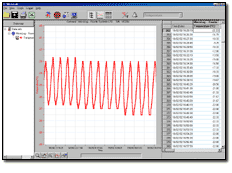
MicroLab Software  

MicroLab Features:

  • Complete data analysis
  • Downloads from MicroLog
  • Automatic daily download
  • Graph and table displays
  • Alarm levels per MicroLog displays
  • Ability to set-up MicroLog
  • Sensor definition
  • Comments for each data logger
  • Automatic data saving
  • Daily status reports in various formats


New data analysis features for both MicroLab and MicroLabPLUS software.

These features respond specifically to requests from the field that enable a broader and more complex range of application environments. Not only do both versions now support the MicroLogPRO, new 10bit datalogger but provide analysis functionality including statistics – maximum, minimum and average enabling a quick glance summary of the environment and historical analysis. This is usually used by pharmaceutical companies who need a constant bird's eye picture of the conditions their materials are kept in.

Mean kinetic temperature, an expression of cumulative thermal stress in different temperatures during storage, transportation and distribution.

Pasteurization provides analysis for the most common methods of pasteurization in Industry: High Temperature Short Time (HTST); Ultra Pasteurization (UP) and Ultra High Temperature (UHT) pasteurization.

Histogram provides a graphical view of historical results presented according to defined parameters of periods of time and percentage levels. This provides a level of analysis which can be tailored to specific environment needs for an immediate picture. For example this can be used in a museum environment where the percentage of time the humidity reached certain levels can be viewed.

Data can be clearly identified according to the ID number of the logger it came from and the threshold relevant to that logger. MicroLab automatically saves the data and produces daily status reports of your environment.

Daily download file management. In addition to the standard general method used in the MicroLab currently, Fourier is now providing a second method. This divides the data into daily 24 hour periods and stores them as separate whole units. Working with this method will complete data in corrupted files and provide full reports to meet external standards.

Text note enables text marks to be placed on the graph at relevant points where certain information needs to be highlighted.

Data records can be exported to your preferred spreadsheet using the included MicroLog 2 Excel software.

GMT Recording
Setting data recording to meet with GMT - Greenwich Mean Time for use in international environments, particularly export and import.


MicroLabPLUS
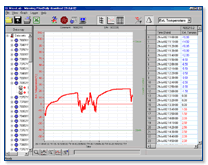
MicroLabPLUS Software   Try me!

MicroLabPLUS Features:

  • Wireless communication with up to 200 MicroLogs
  • Real-time multiple parameter sensor readings
  • Data displayed in meters or graphs
  • Visual and audio alarms when data exceeds thresholds
  • Email and cell-phone notification
  • Battery level displayed
  • Automatic data savings and exports to Excel
  • MicroLog set-up including:
    • Sensor definition
    • Sensor calibration
    • ID number for cradles
    • Alarm levels and properties of loggers
    • Comments for each logger
    • Sampling rates: every 10 seconds to 2 hours
 

New data analysis features for both MicroLab and MicroLabPLUS software.

These features respond specifically to requests from the field that enable a broader and more complex range of application environments. Not only do both versions now support the MicroLogPRO, new 10bit datalogger but provide analysis functionality including statistics – maximum, minimum and average enabling a quick glance summary of the environment and historical analysis. This is usually used by pharmaceutical companies who need a constant bird's eye picture of the conditions their materials are kept in.

Mean kinetic temperature, an expression of cumulative thermal stress in different temperatures during storage, transportation and distribution.

Pasteurization provides analysis for the most common methods of pasteurization in Industry: High Temperature Short Time (HTST); Ultra Pasteurization (UP) and Ultra High Temperature (UHT) pasteurization.

Histogram provides a graphical view of historical results presented according to defined parameters of periods of time and percentage levels. This provides a level of analysis which can be tailored to specific environment needs for an immediate picture. For example this can be used in a museum environment where the percentage of time the humidity reached certain levels can be viewed.

A screen shot of the actual working environment indicates pictorially where the sensors are placed and allows for immediate alert identification and resolution. Data can be clearly identified according to the ID number of the logger it came from and the threshold relevant to the that logger.

MicroLabPLUS lost communication alarm:
Added alarm features for lost communication, indicates when the signal has been lost, when communication has been regained and when the battery is low.

Cradle activation and deactivation transmission means that the user can select which cradles from his entire environment he wishes to view and record at any given moment.

Selection of historic files according to sampling and average rates. On opening any given file the software automatically provides the option to select a specific data transmission time period and sampling rate.

Download the MicroLabPLUS feature-specific tours:

Auto Setup
Cradle Map


MicroLog 2 Excel™
MicroLog 2 Excel™ Software  


MicroLog 2 Excel takes MicroLog data and seamlessly transfers it to an Excel spreadsheet based on the sampling rate and external sensors that were predefined by the user. A single click on the 'downloading' icon transfers the entire disk memory of a MicroLog device to Excel. A similar version for the MAC Appleworks® spreadsheet is also available. 


DatPass
DatPass Software  


All MicroLab and MicroLabPLUS software, when used in conjunction with DatPass software, is FDA Title 21 CFR Part 11 compliant. The software not only stores the data of each MicroLog but can also set the MicroLog alarm level, sampling rate and all other necessary parameters.